
Functions and operators
- Purpose
- Every operator and helper function you can use in a formula, how each field type reads inside a formula, and what an empty field becomes.
- Who is this for
- Admins
- Prerequisites
- A formula field to write in. See Formula basics.
- Permissions
- Admin role to write a formula. Anyone who can see the record sees the result.
Operators and functions are the building blocks of a formula. Use this page to look up what each one does in the Expression box. For the steps to create a formula, see Formula basics.
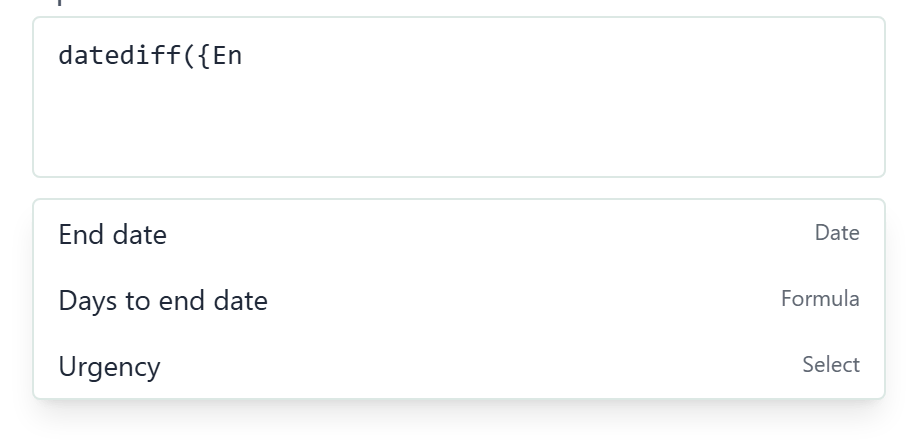
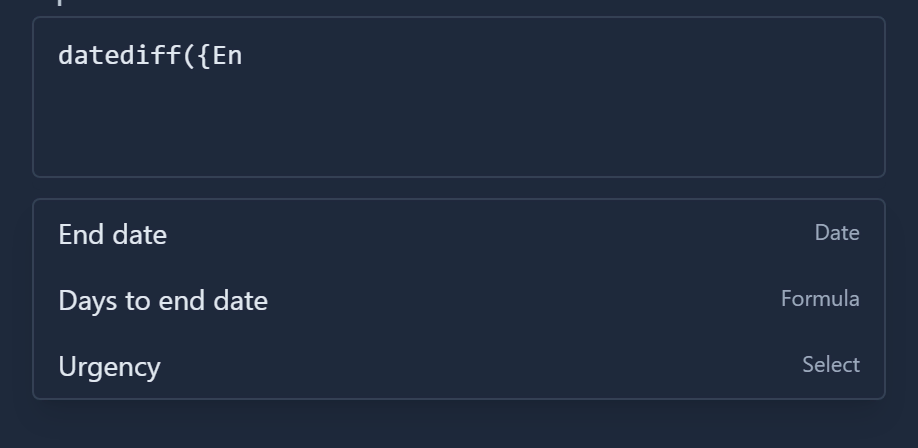
In Expression, type letters outside braces and Gembaa suggests matching functions. Type { and it suggests fields.
Write function names and the words and, or and not in lowercase. IF( and Today do not work.
Operators
| Operator | What it does | Example | Result |
|---|---|---|---|
+ - * / | Add, subtract, multiply, divide. | {Budget} * 1.2 with Budget 350000 | 420000 |
% | Remainder after dividing. | 7 % 3 | 1 |
^ | Power. | 2 ^ 3 | 8 |
== | Equal to. Compares exactly: text "4" is not the number 4. | {Priority} == "High" | Yes or No |
!= | Not equal to. | {Status} != "Done" | Yes or No |
< > <= >= | Less than, greater than, and the "or equal" versions. Work on numbers and dates. | {Due date} < today | Yes or No |
and | Yes only when both sides are Yes. | {Budget} > 0 and {Progress} < 50 | Yes or No |
or | Yes when either side is Yes. | {Priority} == "High" or {Priority} == "Urgent" | Yes or No |
not | Reverses Yes and No. Put the test in brackets. | not ({Status} == "Done") | Yes or No |
|| | Joins text. Numbers are turned into text first. | {First name} || " " || {Last name} | Sarah Kobayashi |
test ? a : b | If the test is Yes, give a, otherwise b. | {Budget} > 100000 ? "Large" : "Small" | Large with Budget 350000 |
( ) | Groups part of a formula so it is worked out first. | ({Budget} - {Spent}) / {Budget} | A number |
Notes on the operators:
=on its own does not work. Use==to compare.- Use
andandor, not&&. Use!=, not<>. +adds numbers only."Total: " + {Budget}givesNaN. Join text with\|\|.- Multiplication and division happen before addition and subtraction. Use brackets to change the order.
notapplies only to the next value, so writenot ({Status} == "Done")with brackets.- A
test ? a : bcan be chained:{Progress} >= 75 ? "Green" : {Progress} >= 40 ? "Amber" : "Red". It is worked out last, so{Priority} == "High" or {Priority} == "Urgent" ? "Escalate" : "Normal"needs no extra brackets. - Text goes in double or single quotes.
trueandfalseare values.
Functions
The help line under Expression lists these nine.
| Function | What it does | Example | Result |
|---|---|---|---|
if(test, then, else) | Gives then when the test is Yes, otherwise else. With two values and no else, the else is blank. | if({Budget} > 100000, "Large", "Small") | Large with Budget 350000 |
today | Today's date. today() works too. | datediff({End date}, today) | Days until the end date |
datediff(a, b) | Whole days from b to a (a minus b). Positive when a is later. | datediff(date("2026-12-31"), today) | 88 on 4 October 2026 |
date("2026-01-31") | A fixed date. Write it as year-month-day. | date("2026-12-31") with result type Date | 31 Dec 26 |
abs(x) | The number without its minus sign. Takes one value. | abs(-5) | 5 |
min(a, b) | The smaller value. Accepts more than two values, and works on dates. | min(5, 2, 9) | 2 |
max(a, b) | The larger value. Works on numbers and dates. | max(0, -3) | 0 |
round(x) | Rounds to the nearest whole number. Takes one value. | round(2.567) | 3 |
count({Field}) | The number of values in a Multi-select, Relation or User field. Empty gives 0. | count({Members}) with three members | 3 |
roundhas no decimal places option. To round to 2 decimal places, writeround(x * 100) / 100.- Halves round up towards the higher number:
round(2.5)gives 3 andround(-2.5)gives -2. dateaccepts the ISO form only.date("31/12/2026")gives a warning.datediffneeds both values. With one, the result cannot be worked out.max({End date}, today)gives the later of the two dates.counttakes one field in braces and nothing else.count(1)andcount({Score} + 1)fail withcount() needs a field: count({Field}). It does not count a linked field such ascount({Program}.{Name}).counton any other field type gives the warningcount() accepts only a Multi-select, a Relation or a User field:followed by the field name in braces. Empty entries are not counted, so a Multi-select with nothing chosen gives0.countof a Relation that links one record gives1, or0when it is empty.- You can use the result in other maths and tests:
count({Members}) > 2, orif(count({Tags}) == 0, "none", "some").
Field types in formulas
Inside a formula, a field turns into a plain value. This matters for empty fields and for fields that look like numbers.
| Field type | Read as | When the field is empty |
|---|---|---|
| Number | A number. | 0 |
| Currency | A number, with no currency symbol. | 0 |
| Progress | A number from 0 to 100. | Empty text, not 0. Test it with == "". |
| Date | A whole number of days, so date maths is plain arithmetic. | Today's date, not blank. |
| Text, Email, URL | Text. | Empty text. |
| Checkbox | Yes or No. | No. |
| Select, Status, Priority | The label as text, even when it looks like a number. | Empty text. |
| Multi-select | All labels joined with commas and no spaces, for example Customer excellence,Product growth. | Empty text. |
| Formula | The other formula's result, read as its own result type. | Depends on that formula. |
| Rich text | Unreadable stored text. Do not use it. | Empty text. |
| Relation | The linked record's id, not its name. Do not use it on its own. To read a field of the linked record, use {Relation}.{Field}. To count the links, use count. | Empty text. |
Read a linked field
Add a dot and a field name after a single-link Relation field to read that field from the linked record: {Program}.{End date}. The value is read as its own field type, so a linked Number is a number and a linked Date is a day count.
| Write | What it gives |
|---|---|
{Rel}.{Field} | One field of the record the Relation field links. |
{Rel:Type}.{Field} | The same, naming the entity type. Required when the Relation field can link more than one type. A record of another type reads as empty. |
{Rel}.type | The linked record's entity type name, such as Project. Empty when nothing is linked. |
Only one link is followed. For the rules and the errors, see Formula basics and Fix formula problems.
Unreadable fields
These are not available in formulas:
- Latest pulse, Allocation, Current Rate and Skills. They are left out of the
{list, and typing one gives "Field not supported in formulas". - Created and Updated, which are not fields.
What surprises people
- An empty date counts as today. Gembaa cannot tell it from a real date of today.
- A Select value compares as text:
{Strategic} == "4"is Yes,{Strategic} == 4is No. Subtraction, multiplication and division still treat it as a number. - A Multi-select compares as one joined text, so
{Value driver} == "Product growth"is No when two labels are chosen. - Dates are whole days, so
{Start date} + 30is the date 30 days later. Result type Date shows it as a date. Result type Text shows a day count such as21183.
After == or != on a Select, Status or Priority field, the box suggests that field's options and inserts the one you pick in quotes, for example {Health} == "At risk".
Good to know
- Brackets and quote marks must be paired. An unclosed
{,(or"gives an error. See Fix formula problems. - Text without quotes is read as a field or function name and fails.
- For ready-made formulas, see Common formulas.